PicsLeap–AI Photo Editor &Grid
- 4.4
- Rating
- 100.00K
- Installs
- Free
- Price
 Analysis by App-foxy
I approached PicsLeap–AI Photo Editor &Grid as a practical photography app rather than just another collection of filters. Its promise is broad: editing, collage creation, AI enhancement, cartoon-style effects, stickers, and background work in one place. That range is appealing when I want to turn a few ordinary phone photos into something shareable without moving between several apps. At the same time, an all-in-one editor deserves a closer look, because convenience can sometimes mean crowded menus, uneven results, or less control than a specialist tool.
My overall impression is that this is best understood as a quick creative workspace for casual editing. It is free to download, aimed at Everyone, and has reached over 100K installs. The app comes from Magic Photo Collage & Photo Editor - CollageArt, and its current version is 2.4.02. Those details matter less than how the editor fits into daily use: I can imagine opening it after a birthday, a short trip, or a family gathering when I want a finished image quickly rather than a technically perfect production.
What the editor is really trying to do
The strongest idea behind PicsLeap is not one standout tool but the ability to move between several visual tasks in one session. I can begin with a normal photo, improve its appearance, try a more playful cartoon treatment, add stickers, and then place the result into a collage. That makes the app more useful for people who create social posts, greeting images, simple mood boards, or informal albums.
You May Also Like

 AccuWeather: Weather Radar
AccuWeather Review: A Quick, Clear Forecast for Everyday Decisions
For everyday plans, the best forecast is the one you can understand quickly. AccuWeather makes rain timing, radar, and local conditions easy to act on, with a few trade-offs.

 Hill Climb Racing
Why Hill Climb Racing Still Turns Crashes Into One More Run
A tiny car, a bumpy hill and one more upgrade: Hill Climb Racing keeps resurfacing because its simple chaos makes every near-miss feel personal.

 AliExpress - Shopping App
AliExpress Makes Global Shopping Feel Personal, but Shoppers Bear the Risk
AliExpress turns a global marketplace into a pocket-sized discovery engine. Its reach is useful, its shopping loop compelling, and its trade-offs easy to miss.

 Lords Mobile: Kingdom Wars
Lords Mobile Is a Kingdom-Building Routine, Not a Quick Match
A case-by-case verdict on the building, battles, device demands, and social commitments that make Lords Mobile rewarding for some players and exhausting for others.

 PDF Scanner app - TapScanner
TapScanner Makes Paperwork Easier to Capture, Check, and Share
TapScanner makes scanning with a phone feel less like a rescue operation and more like a dependable step in getting work done. Its capture tools are useful, though not flawless.

 Block Blast!
 Shows How Much a Puzzle Game Can Leave Out
A quiet grid game shows why puzzle players increasingly value instant clarity, repeatable skill and low-pressure play—and where the genre still needs to catch up.
More From Our News Desk
View All News


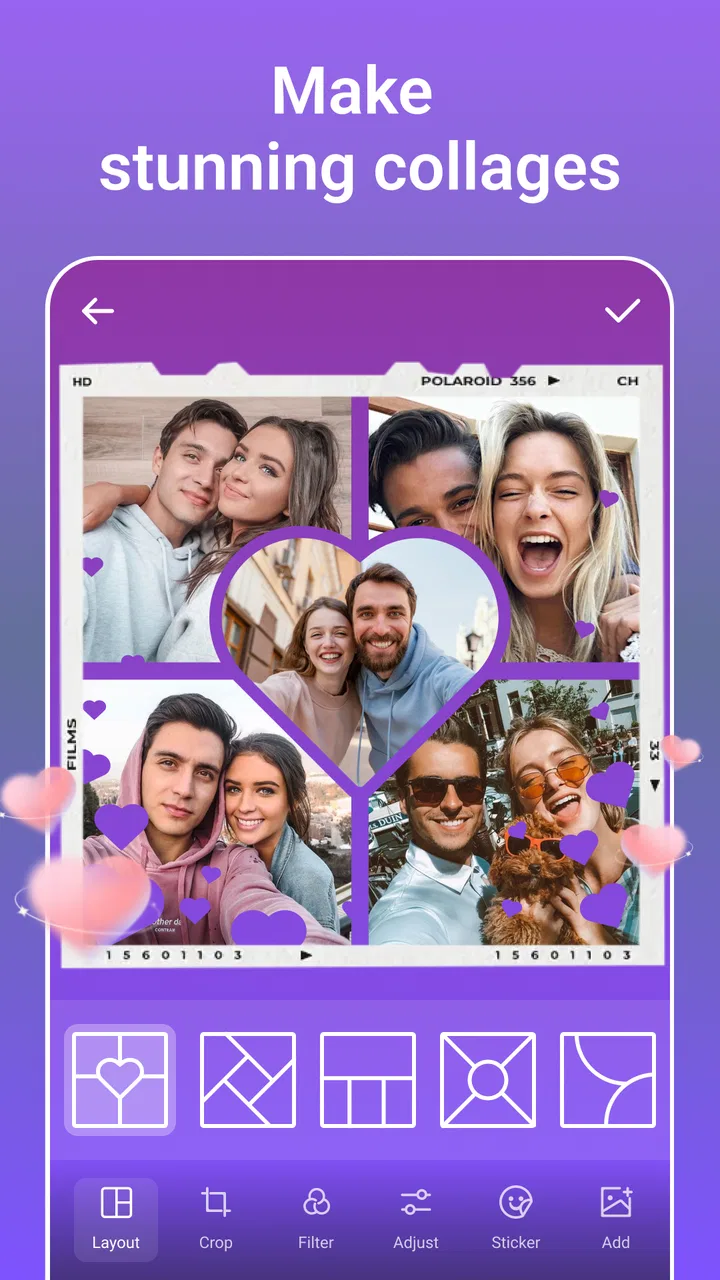
The store summary presents it as an all-in-one editor with AI enhancement, collage tools, cartoon effects, funny stickers, and background editing. In practice, that combination creates two different experiences. One is functional: crop, adjust, arrange, and finish an image. The other is expressive: transform a portrait, decorate a picture, or build something deliberately exaggerated. I found the second side more distinctive, while the first side is mainly about saving time.
It is worth setting expectations correctly. I would not choose this app as my main tool for professional retouching, detailed color correction, or carefully controlled compositing. Its appeal is speed and variety. If I need a clean image for a profile, a playful post for friends, or a compact collage from several pictures, the broad toolbox makes sense. If I need precise masking around hair, consistent edits across a large photo set, or fine control over every adjustment, a dedicated editor is likely the better fit.
A realistic everyday workflow
Imagine coming home from a small celebration with several portraits and a few group shots. Instead of choosing one image and applying a single filter, I could use the editor to improve a selected portrait, add a light decorative element, and then combine the best pictures into a collage. The useful part is the sequence: the app supports a complete small project rather than forcing me to export after every stage.
For that kind of situation, I would start with the least dramatic correction first. An AI enhancement can be useful when a picture looks slightly dull or lacks presence, but I would inspect the result before adding stickers or changing the background. Strong effects can hide problems temporarily while making faces or edges look unnatural. A restrained edit usually gives the collage a more coherent appearance.
Another practical use is preparing several versions of the same image for different contexts. I might make a clean crop for a profile, a decorated version for a message, and a multi-image layout for a social update. The app’s range is helpful here, although I would keep the original photo untouched and treat each edited result as a separate creative version.
Where the AI tools help, and where caution matters
AI enhancement is most useful when I want a fast attempt at making a photo look more polished without manually adjusting every setting. It can serve as a starting point, especially for casual images taken in less-than-ideal conditions. I would not treat the first result as automatically correct. Enhancement can change the character of skin, sharpen details that were never really present, or make a soft image appear overly processed.
My preferred workflow is to compare the enhanced version with the original before continuing. If the face looks too smooth or small details become harsh, I would reduce the effect or return to the unenhanced image. This is one of the less obvious trade-offs of a quick AI feature: it saves time, but it also encourages accepting a result before noticing subtle changes.
The cartoon tools are a different kind of feature. They are not intended to preserve realism; their value comes from transformation. I see them working well for avatars, playful messages, themed posts, and images where personality matters more than accuracy. They are less suitable when the goal is to present a natural portrait or retain the exact appearance of a person.
Background editing also needs a deliberate approach. A replacement can make a simple subject stand out, but the quality of the final image depends heavily on the boundary around the person or object. I would zoom in and inspect hair, fingers, thin straps, and other fine edges before sharing. A background that looks convincing at a glance may reveal rough separation when viewed closely.
Collages are more than a shortcut
The collage side is useful because it changes how I think about a group of photos. Instead of posting several separate images, I can create one visual summary. That is convenient for travel memories, event recaps, product snapshots, or a sequence showing a craft project. The main challenge is selection: adding too many images can make every photo feel small and reduce the impact of the layout.
I get better results by choosing pictures with a shared color mood or a clear story. For example, I might place a wide scene beside two close details, rather than using five nearly identical portraits. This is a creative decision rather than an app feature, but the editor makes that decision practical by bringing the images together in one composition.
A useful trick is to edit the individual photos before arranging them. If one image is much darker or more saturated than the others, the finished collage can feel disjointed. I would make modest corrections first, then build the layout, and only afterward add decorative elements. This order prevents stickers and frames from distracting me from basic consistency.
Stickers and visual personality
The funny sticker tools give the app a lighter tone than a conventional photo editor. I can see them working for birthday images, informal invitations, jokes between friends, and quick posts that are meant to feel spontaneous. They also make the app more approachable for someone who finds technical editing intimidating.
There is a point where decoration becomes clutter. I would normally choose one visual idea and support it with a small number of elements rather than placing every available effect on the same photo. Stickers are most effective when they guide attention or reinforce the mood. They are less effective when they cover faces, compete with text, or make a collage difficult to read.
This is also where PicsLeap differs from a typical basic gallery editor. A gallery editor may be faster for cropping and rotating, while a social design tool may offer more structured layouts and typography. PicsLeap sits between those options: it gives me more creative play than a built-in editor, but it may not provide the same level of design discipline as a dedicated layout application.
Trust, controls, and moments that deserve care
Because this app handles personal photos, I would pay attention to every visible choice before starting an edit. The most sensitive moments are obvious: selecting a private portrait, using an AI-based transformation, changing a background, or preparing an image that includes children, identification documents, or a home interior. I would avoid importing anything unnecessarily sensitive when a less revealing picture can achieve the same result.
I also prefer to review the app’s prompts and available settings rather than tapping through them automatically. When an editor offers several creative functions, it is easy to focus on the result and overlook what I am choosing at each step. My approach is simple: select only the images needed for the current project, inspect any permission request in context, and close a workflow if the requested access does not make sense for the task.
Account and privacy decisions should remain user-led. I would not assume that a photo is private merely because I edited it locally, and I would not assume that an AI effect has no data implications without checking the app’s current notices and controls. The safest habit is to read the relevant in-app explanation, use the narrowest available choice, and avoid testing sensitive images just to see what an effect can do.
That caution does not make the app unusable. It simply reflects the difference between editing a landscape and editing a personal document. For ordinary creative work, I can use a non-sensitive image first, understand the workflow, and then decide whether the result and the visible controls are appropriate for anything more personal.
How much control will you have?
My sense is that PicsLeap prioritizes accessible results over deep manual control. That is a strength for beginners: I can experiment without first learning a complicated editing system. It is also a limitation for experienced users who want exact adjustments, repeatable settings, or a highly predictable output.
The app is free, but it includes in-app purchases ranging from $0.99 to $47.99 per item. I would treat that as an important part of the decision before investing time in a project. A free starting point is useful for exploring the workflow, but I would check which tools are available without payment before building an edit around a particular effect. The practical question is not simply whether the app costs nothing to install; it is whether the specific tools I want are accessible within my preferred budget.
I would also keep exported originals and avoid replacing source files. This is good practice with any editor, but it matters especially when experimenting with enhancement, cartoon effects, or background changes. If an edit looks artificial later, having the original makes it easy to try a gentler approach instead of accepting a compromised result.
Performance expectations and device fit
The app supports devices running Android 7.1 or later, which gives it a broad compatibility range. On an older phone, however, I would be patient with image-heavy tasks and avoid opening a large number of projects at once. AI processing, background work, and layered collages are more demanding than a simple crop, so the experience may feel smoother when I work with one image at a time.
I would also check the final image at full size before sharing. A composition can look fine in the editor preview but reveal softened detail, rough edges, or an overly strong effect after export. This check is particularly important for portraits and background replacements, where small imperfections are more noticeable than they are in a fast-moving feed.
The app’s current version is 2.4.02, and its release history began on January 12, 2021. I mention that context because the product is not a brand-new experiment; it has had time to establish its general direction. Still, creative apps change, so I would rely on the controls and notices visible on my own device at the time of use rather than assuming that every workflow will remain identical.
Who should use it, and who should skip it?
I would recommend PicsLeap to someone who wants one approachable place for quick photo improvements, playful transformations, stickers, and collages. It is especially suitable for casual creators who prefer experimenting over learning a complex professional interface. Families, students, social users, and anyone preparing informal visual messages may find its variety more valuable than a narrow editor with only a few precise tools.
I would be more cautious about recommending it to photographers who need a controlled editing pipeline. If accurate color, non-destructive adjustments, detailed masking, batch consistency, or advanced retouching are central to the work, a specialist photography application should come first. The same applies to users who dislike browsing multiple creative options or who want a very minimal editing screen.
It may also be the wrong choice for someone who regularly works with highly sensitive images and does not feel comfortable reviewing privacy choices before using AI or background-related tools. In that situation, a simpler editor with a workflow that the user already understands may offer greater confidence, even if it has fewer effects.
My cautious verdict
PicsLeap succeeds when I treat it as a flexible, casual creative kit rather than a replacement for every photography tool. Its combination of enhancement, cartoon effects, background work, stickers, and collage building makes it easy to turn a basic phone photo into something more personal. The free entry point and Everyone content rating also make it approachable for a wide audience.
The trade-off is control. The more automated and playful the effect, the more carefully I need to inspect faces, edges, colors, and the final composition. I would also review visible permissions, data explanations, account choices, and purchase prompts instead of assuming that convenience answers those questions for me. That habit is particularly important when editing private portraits or images containing identifying details.
With those limits in mind, I would suggest trying it for a small, ordinary project first: make one collage, test one enhancement, and inspect the result before committing to a larger collection. If the fast workflow matches what you need, the app can replace several lightweight tools for everyday creative tasks. If you want exact photographic control or a carefully documented privacy workflow, I would look elsewhere. For casual visual storytelling, though, the best reason to try PicsLeap is its ability to take an idea from raw photo to playful finished image without making the process feel like a technical project.
FAQs for PicsLeap–AI Photo Editor &Grid
01What features does PicsLeap–AI Photo Editor & Grid offer?
PicsLeap–AI Photo Editor & Grid comes packed with a variety of features including AI-powered editing tools, a wide range of filters, customizable grids, and advanced retouch options. Users can enhance photos with ease, create stunning collages, and apply creative effects to bring their images to life seamlessly.
02Is PicsLeap–AI Photo Editor & Grid beginner-friendly?
Absolutely! PicsLeap is designed for both beginners and experienced users. Its intuitive interface makes it easy to navigate and use without requiring a steep learning curve. The AI tools simplify complex editing tasks, making it accessible for users who want quick, professional-looking results without advanced knowledge.
03How does the AI feature enhance photo editing in PicsLeap?
The AI feature in PicsLeap automates many editing tasks, such as adjusting lighting, enhancing colors, and removing blemishes. It intelligently analyzes the photo and applies the best possible edits to improve image quality. This allows users to achieve professional results without manual adjustments, saving time and effort.
04Does PicsLeap–AI Photo Editor & Grid support high-resolution images?
Yes, PicsLeap supports high-resolution images, ensuring that photo quality is maintained throughout the editing process. Users can edit, save, and share images without compromising on detail or clarity, making it ideal for photographers and social media enthusiasts who need high-quality outputs.
05Are there any in-app purchases or subscriptions in PicsLeap?
While PicsLeap offers a variety of free features, it also includes in-app purchases and subscription options for users interested in accessing premium tools and additional content. These purchases unlock advanced features, such as exclusive filters and effects, providing a more comprehensive editing experience.
Pros
- Intuitive user interface for easy navigation.
- Wide range of AI-powered editing tools.
- Seamless integration with social media.
- High-quality export options available.
- Regular updates with new features.
Cons
- In-app purchases required for premium tools.
- Occasional lag on older devices.
- Limited offline functionality.
- Ads can be intrusive at times.
- Requires a stable internet connection.

PicsLeap–AI Photo Editor &Grid
Gallery